Open Order
An open order is an active trading instruction submitted to a broker, exchange, or electronic matching engine that has been validated and rests on the order book awaiting execution, having neither been filled, cancelled, nor expired.
What Is an Open Order?
In securities, futures, and foreign exchange trading, an open order is an unexecuted order that remains active in the trading system or exchange order book. Unlike immediate market orders that execute instantly against prevailing quotes, open orders are typically conditional instructions—such as limit orders, stop-loss orders, or stop-entry orders—where the execution condition has not yet been satisfied by current market pricing.
An open order persists in the matching engine until one of four events occurs:
- Full Execution (Fill): The market price touches or crosses the order’s trigger price, and the specified volume is completely matched against incoming counter-liquidity.
- Partial Execution: A portion of the order is filled, leaving the remaining unfilled quantity resting as an open order.
- Cancellation: The trader or an algorithmic script manually or programmatically revokes the resting instruction before execution.
- Expiration: The order reaches the end of its specified time-in-force parameter (e.g., end-of-day expiration for a Day order).
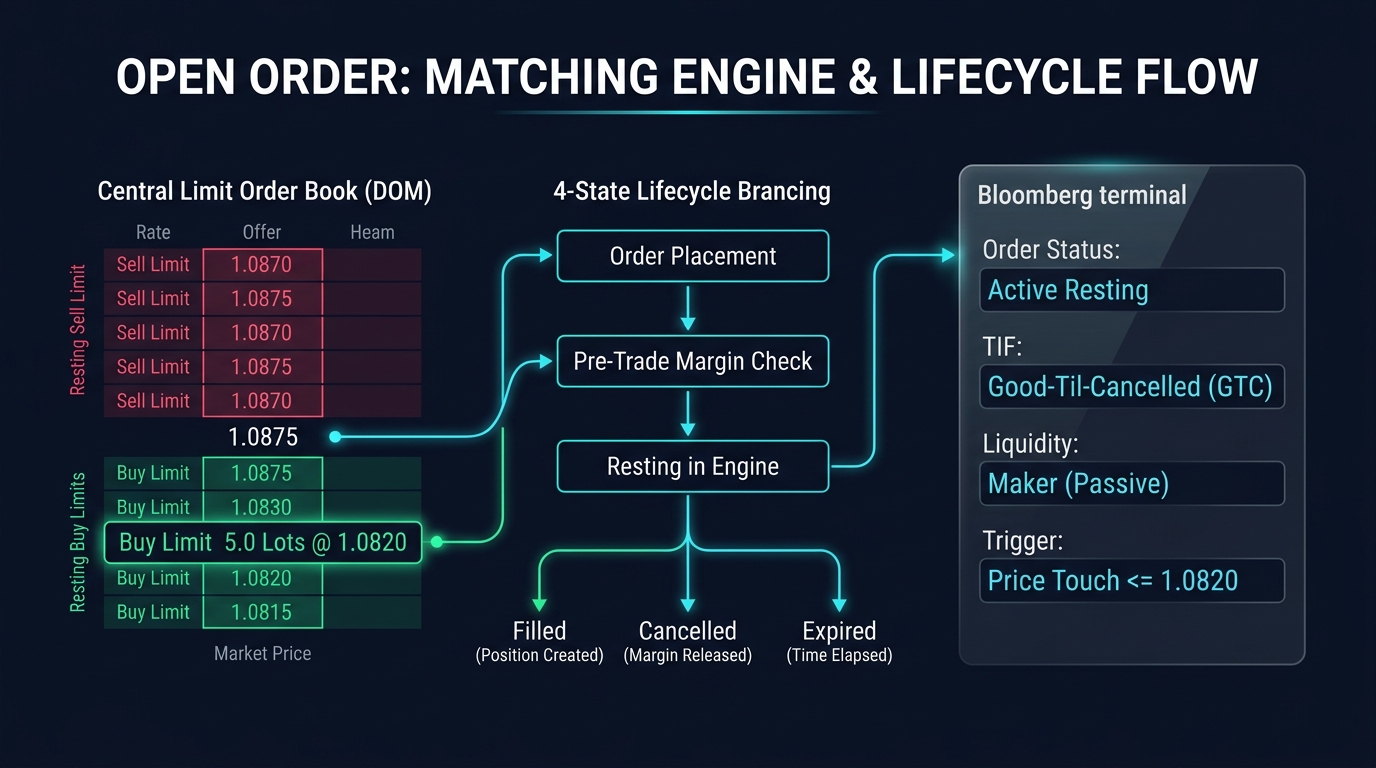
                      OPEN ORDER LIFECYCLE ARCHITECTURE

  [Trader Action]  ---> Submits Limit Buy: 5.0 Lots EUR/USD @ 1.0820
                              (Current Market Price: 1.0875)
                                           |
                                           v
  [Broker Risk Check] ---> Pre-Trade Margin Validated & Reserved
                                           |
                                           v
  [Order Book Placement] -> Enters Matching Engine as RESTING OPEN ORDER
                                           |
                   +-----------------------+-----------------------+
                   |                       |                       |
                   v                       v                       v
            [Market Drops]          [Trader Revokes]        [Time Expires]
         Price Hits 1.0820          Cancel Request Sent     Session Closes (Day)
                   |                       |                       |
                   v                       v                       v
           Order FILLED            Order CANCELLED         Order EXPIRED
        (Becomes Position)        (Margin Released)       (Margin Released)
Types of Open Orders and Execution Logic
Traders deploy open orders strategically to manage entries and exits without being tied to live price feeds:
1. Limit Orders (Liquidity-Providing Open Orders)
A limit order specifies the maximum price a buyer is willing to pay or the minimum price a seller is willing to accept:
- Buy Limit: Placed below the current market price. It rests on the order book as a bid.
- Sell Limit: Placed above the current market price. It rests on the order book as an offer.
- Limit orders provide liquidity to the market and typically incur lower trading fees or earn maker rebates on institutional exchanges.
2. Stop Orders (Contingent Liquidity-Taking Orders)
A stop order remains latent until the market trades at or through a specified stop price:
- Sell Stop (Stop-Loss / Breakdown): Placed below the market to cut losses on a long position or enter a short momentum trade.
- Buy Stop (Stop-Loss / Breakout): Placed above the market to cut losses on a short position or enter a long breakout.
- Once triggered, a stop order converts instantly into a market order, taking liquidity and subjecting the execution to potential slippage.
Time-in-Force (TIF) Designations for Open Orders
The duration for which an open order remains valid is dictated by its Time-in-Force (TIF) parameter:
| TIF Parameter | Operational Rule | Behavior at Market Close |
|---|---|---|
| Good ’Til Cancelled (GTC) | Remains open indefinitely until filled or explicitly cancelled by the trader. | Carries over across daily market closes and weekend trading sessions (subject to broker policies). |
| Day Order | Remains open only during the current trading session in which it was submitted. | Automatically cancelled by the broker matching engine at the daily trading cut-off (e.g., 5:00 PM EST). |
| Immediate or Cancel (IOC) | Executes immediately against available liquidity; any unfilled portion is instantly cancelled. | Never rests on the book; cannot persist as an open order. |
| Fill or Kill (FOK) | Must be executed immediately in its entirety or rejected completely. | Never rests on the book; zero open order persistence. |
| Good ’Til Date (GTD) | Remains active as an open order until a specified calendar date and time. | Automatically purged by the server upon reaching the designated expiration timestamp. |
Margin Allocation on Open Orders
A critical, often misunderstood operational aspect of open orders is margin reservation:
- When an open order is placed with a broker, the broker’s risk management engine calculates the initial margin required if that order were to be executed immediately.
- This amount is deducted from the trader’s Free Margin, moving it into reserved capital.
- If a trader has an account equity of $10,000 and places open limit orders requiring $8,000 in aggregate margin, their remaining Free Margin drops to $2,000, preventing them from placing additional leveraged trades even though no cash has yet been deployed into an active position.
Real-World Case Study: Flash Crash Gapping Through Open Stop Orders
During the Asian trading session on January 3, 2019 (known in forex history as the “Apple Flash Crash”), severe liquidity thinning caused USD/JPY to plummet over 400 pips in seven minutes (dropping from 108.80 to 104.80).
- The Setup: A swing trader held a long position in USD/JPY at 109.50, protected by an open sell stop order resting at 108.30.
- The Gap Event: When liquidity evaporated across interbank matching engines, bids between 108.20 and 106.50 vanished completely within milliseconds.
- The Execution: The trader’s open stop order was triggered the instant the market traded through 108.30. However, because stop orders convert into market orders, the order could not fill at 108.30. The first available interbank bid matched the execution at 106.10.
- The Result: The trader experienced 220 pips of negative slippage, losing significantly more capital than planned due to the mechanical reality that open stop orders do not guarantee execution price in illiquid gaps.
Frequently Asked Questions
Can I cancel or modify an open order at any time?
Yes. As long as the order has not been filled, a trader can submit a Cancel or Cancel/Replace (Order Modify) request via their platform to change the limit price, stop price, or order volume without incurring fees.
What is an OCO (One-Cancels-the-Other) open order?
An OCO is a paired contingent order consisting of two open orders (such as a take-profit limit order and a stop-loss order). If the market triggers and fills one of the orders, the trading engine automatically purges and cancels the other open order instantly.
Why do some open orders disappear over the weekend in forex?
Many retail brokers automatically cancel open orders at Friday’s market close (5:00 PM EST) to protect both the firm and the trader from extreme opening price gaps that frequently occur on Sunday afternoons following unexpected geopolitical or economic developments.
Ready to trade forex?
Open a free demo account with a regulated broker. Practice with virtual funds before risking real money.