Mobile Trading
Mobile trading is the practice of conducting financial analysis, placing orders, and managing investment portfolios directly through smartphone or tablet applications connected to brokerage servers via wireless networks.
What Is Mobile Trading?
Mobile trading refers to the execution of financial transactions, chart analysis, and account management through native software applications installed on portable cellular devices, primarily smartphones and tablets powered by iOS and Android operating systems.
Once considered a crude, novelty backup system in the early 2000s—when traders checked delayed price quotes over text-based WAP browsers on PDAs and BlackBerry devices—mobile trading has evolved into the dominant primary interface for global retail finance. According to international brokerage industry data, over 65% of all retail foreign exchange transactions and account logins now originate from mobile applications. Modern mobile trading platforms provide real-time streaming interbank quotes, interactive touch-gesture charting, multi-asset order routing, one-click execution, and instant biometric two-factor authentication (2FA).
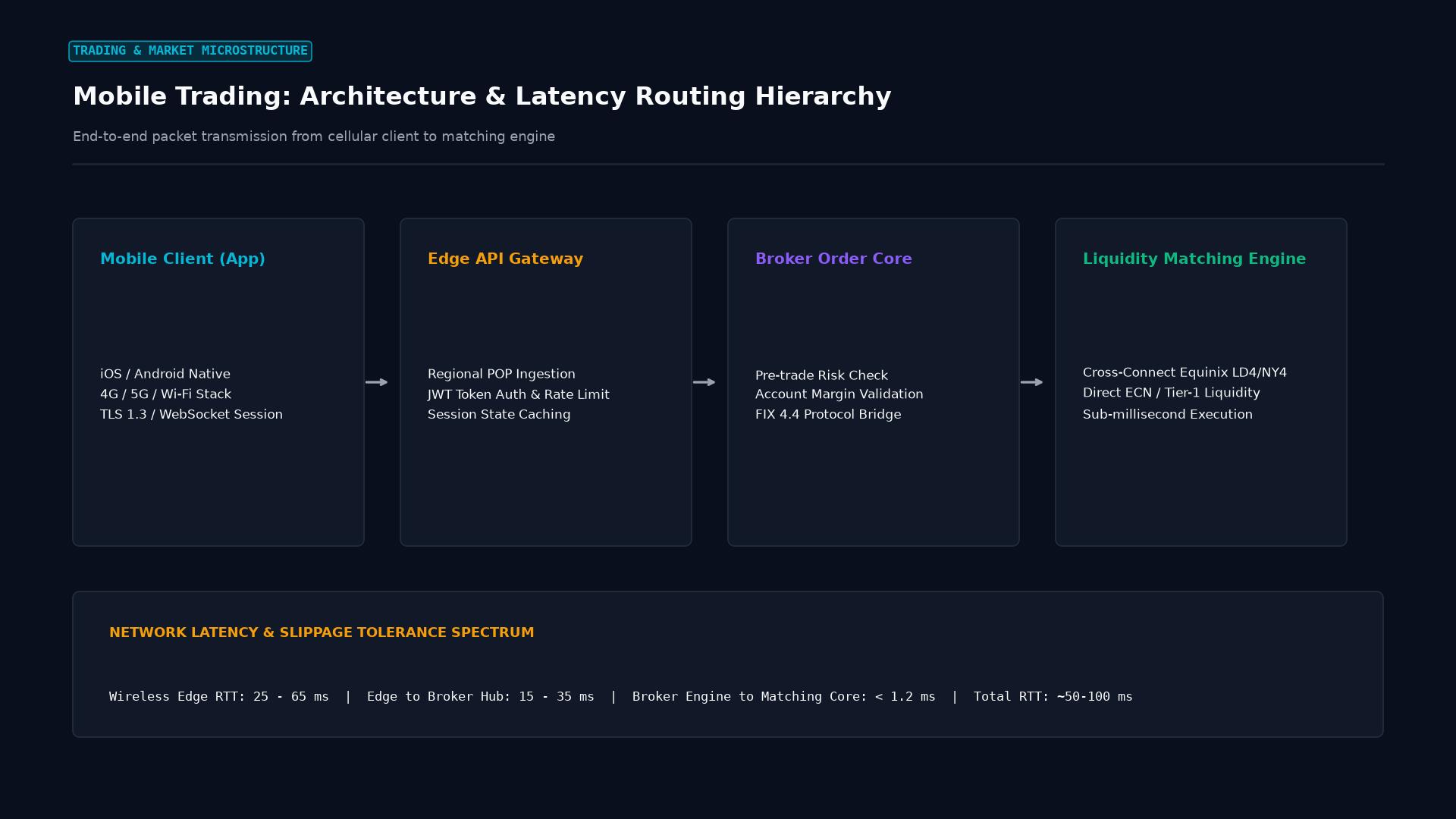 Figure: End-to-end packet transmission from cellular client to matching engine: mobile gateway, broker core, and Equinix data center execution.
Key Takeaways
- 24/5 Portfolio Accessibility: Mobile trading enables continuous, untethered monitoring of open positions, allowing traders to respond to breaking macroeconomic events from anywhere in the world.
- Push Notification Infrastructure: Real-time push alerts notify traders of triggered limit orders, price-level alerts, economic calendar data releases, and critical margin call warnings.
- The “Gamification” Hazard: The tactile, frictionless nature of smartphone interfaces can subconsciously encourage compulsive over-trading and reduce risk awareness, transforming calculated analysis into dopamine-driven gambling behavior.
- Screen Real-Estate Constraints: Small smartphone displays cannot replicate the multi-screen, multi-timeframe analytical rigor of a professional desktop trading workstation.
- Cellular Latency & Connection Drops: Switching between cellular towers or entering connectivity dead zones while holding open execution dialogs can cause dangerous execution delays and severe order slippage.
Comparative Taxonomy: Mobile vs. Desktop vs. Web Trading
| Performance Dimension | Mobile Trading App | Desktop Terminal (MT4/5, cTrader) | WebTrader Browser Interface |
|---|---|---|---|
| Primary Strength | Portability & Emergency Access | Maximum Execution Speed & Depth | Zero installation / Any browser |
| Chart Analysis Depth | Basic to Moderate (Single screen) | Extreme (Multi-screen, 20+ charts) | Moderate (Cloud synced) |
| Algorithmic Support | None (View only; cannot host code) | Native MQL / Python / FIX APIs | Cloud-based webhooks only |
| Order Execution Speed | 80ms – 300ms (Dependent on cell signal) | Sub-10ms (LAN / VPS Collocation) | 50ms – 150ms |
| Execution Risk | “Fat-finger” touchscreen taps | Precision hotkeys & mouse entry | Mouse entry |
| Push Notifications | Native lockscreen alerts | Email / Pop-up notifications | Browser pop-ups |
The Behavioral Economics of Mobile Trading
Extensive academic research into retail investor performance reveals that traders who trade predominantly on mobile smartphones suffer statistically worse long-term returns than those who trade on desktop workstations:
1. The Screen Size Heuristic
On a mobile device, a trader typically views only a narrow historical price window (often 20 to 50 candlesticks on a 6-inch screen). This visual restriction induces myopic loss aversion: traders fixate on micro-fluctuations, mistaking minor 5-minute chart noise for major structural trends.
2. The “Fat-Finger” Problem
Executing orders via touchscreens introduces high mechanical error rates:
- Inadvertently tapping “Buy Market” instead of “Sell Market.”
- Misplacing a decimal point in lot size input (e.g., entering 1.00 lot instead of 0.10 lot), exposing the account to 10x unintended leverage.
Practical Application: The Emergency “Kill-Switch” Workflow
While mobile trading is suboptimal for deep technical analysis, it serves as an indispensable risk-management lifeline.
- Context: A discretionary macro trader conducts extensive weekend analysis on their triple-monitor desktop workstation, establishing a swing long position in AUD/USD with a target 100 pips higher.
- The Shock: While commuting on Monday morning, a sudden geopolitical crisis erupts in Asia. Commodities tumble, and the Australian Dollar begins plunging rapidly toward the trader’s invalidation level.
- Mobile Intervention: The trader pulls out their smartphone, receives an instant push notification from their broker app, and authenticates via FaceID within two seconds.
- The Resolution: Recognizing that the fundamental macro thesis has been shattered, the trader taps the native “Close All Positions” button, instantly liquidating the trade from the subway train. By acting via mobile, the trader cuts the loss at 15 pips rather than waiting hours until arriving at an office desk, saving thousands of dollars in capital.
Security Best Practices for Mobile Traders
- Enforce Hardware Biometrics: Always require FaceID or Fingerprint authentication to unlock the trading app and confirm outbound fund withdrawals.
- Never Trade on Unsecured Public Wi-Fi: Connecting to airport or coffee-shop public Wi-Fi without a trusted VPN exposes your brokerage session tokens to packet-sniffing “man-in-the-middle” (MitM) cyberattacks.
- Disable “One-Click” Trading on Touchscreens: Require an explicit two-step confirmation dialog (“Are you sure you want to execute?”) on mobile apps to prevent accidental trade entry caused by brushing the screen.
Frequently Asked Questions (FAQ)
Can I run automated Expert Advisors (EAs) on my mobile phone?
No. Smartphone operating systems automatically throttle or suspend background processes to preserve battery life, making it impossible to run persistent algorithmic trading bots natively. However, you can host your EA on a remote Virtual Private Server (VPS) and monitor its trades remotely via your mobile app.
Does mobile trading consume a lot of cellular data?
No. Modern mobile trading apps stream price updates using highly compressed binary packets or lightweight JSON WebSockets. A full day of continuous active charting and trading typically consumes less than 15 to 30 megabytes of cellular data.
Is mobile trading safe from a regulatory standpoint?
Yes. Licensed brokers are held to the identical regulatory standards (segregated customer funds, negative balance protection, transparent reporting) regardless of whether trades are initiated via desktop or mobile applications.
Ready to trade forex?
Open a free demo account with a regulated broker. Practice with virtual funds before risking real money.